Previous Tutorial: Creating a GEF Editor – Part 5: Loading the Model from an EMF File
We finished the last tutorial with a working “editor” on which not much editing could be done… So in this tutorial we’ll be adding some editing capabilities to the GEF editor.
But before this, while preparing this tutorial I saw that doing some refactoring to the model we could reduce duplicate code, which is always good. So I did a full refactoring of the model, from which we will start this tutorial (I also renamed the ObjectProcessDiagram class to OPMObjectProcessDiagram for consistency). For your convenience, the new .ecore file can be downloaded from here. Replace your current .ecore file with this file and do “Generate All” on your .genmodel file. This will probably generate some compile errors on your project, but they can be fixed pretty easily. Furthermore, delete the (generated) ObjectProcessDiagram.java file in the modeling project. This will cause more compiler problems that can also be easily fixed, and after this your code should be clean and ready to go (as you see, model refactoring is not yet at the level of code refactoring and has a long way to go… which is pretty bad because it makes developer think too much about the model because model changes are expensive. But NEVER be afraid of refactoring, just do it with caution and with a backup/version control system at hand). You can also download the code (all eclipse projects including generated code) from which the tutorial starts from here.
BTW, I also upgraded my eclipse to the latest eclipse Indigo release, modeling tools package and impressively, things worked just fine. So lets get working.
- First thing we are going to do is add the
OPMProcessmodel entity to our editor. Looking at the model we see that theOPMObjectandOPMProcessclasses share most (actually all) of their attributes… so why duplicate? basically this is because the realOPMObjectandOPMProcesscontain many more attributes that do differentiate them. But this sharing of information makes us think that also the classes used by GEF should have some hierarchy so that code is not duplicated. So we are going to create an interfaceOPMThingFigure(for theOPMObjectFigureandOPMProcessFigureclasses) and an abstract classOPMThingEditPart(for theOPMObjectEditPartandOPMProcessEditPart). In the first case we had to use an interface instead of an abstract class because we had some problems withdraw2dpainting order and instancing order between the super-class and the sub-class (or something like that… I should have written that down :-(), which made the code look pretty ugly.package com.vainolo.phd.opm.gef.editor.figure; import org.eclipse.draw2d.IFigure; import org.eclipse.draw2d.Label; public interface OPMThingFigure extends IFigure { public Label getNameLabel(); }package com.vainolo.phd.opm.gef.editor.part; import org.eclipse.gef.editparts.AbstractGraphicalEditPart; import com.vainolo.phd.opm.gef.editor.figure.OPMThingFigure; import com.vainolo.phd.opm.model.OPMThing; public abstract class OPMThingEditPart extends AbstractGraphicalEditPart { @Override protected void refreshVisuals() { OPMThingFigure figure = (OPMThingFigure)getFigure(); OPMThing model = (OPMThing)getModel(); OPMObjectProcessDiagramEditPart parent = (OPMObjectProcessDiagramEditPart) getParent(); figure.getNameLabel().setText(model.getName()); parent.setLayoutConstraint(this, figure, model.getConstraints()); } }Now remove the
refreshVisualsmethod from theOPMObjectEditPartclass and make the class extendOPMThingEditPart. Also makeOPMObjectFigureimplementOPMThingFigureand rename thegetLabelmethod togetNameLabelto make them compatible with the interface.package com.vainolo.phd.opm.gef.editor.figure; import org.eclipse.draw2d.Figure; import org.eclipse.draw2d.Graphics; import org.eclipse.draw2d.Label; import org.eclipse.draw2d.RectangleFigure; import org.eclipse.draw2d.XYLayout; import org.eclipse.draw2d.geometry.Rectangle; public class OPMObjectFigure extends Figure implements OPMThingFigure { private Label label; private RectangleFigure rectangle; public OPMObjectFigure() { setLayoutManager(new XYLayout()); rectangle = new RectangleFigure(); add(rectangle); label = new Label(); add(label); } @Override protected void paintFigure(Graphics graphics) { Rectangle r = getBounds().getCopy(); setConstraint(rectangle, new Rectangle(0, 0, r.width, r.height)); setConstraint(label, new Rectangle(0, 0, r.width, r.height)); } public Label getNameLabel() { return label; } }package com.vainolo.phd.opm.gef.editor.part; import org.eclipse.draw2d.IFigure; import com.vainolo.phd.opm.gef.editor.figure.OPMObjectFigure; public class OPMObjectEditPart extends OPMThingEditPart { @Override protected IFigure createFigure() { return new OPMObjectFigure(); } @Override protected void createEditPolicies() { // TODO Auto-generated method stub } }The editor should still be working as it did before this refactoring (try it just in case…)
- We’ll add now the
OPMProcessto our editor. This is done much like we did forOPMObject: create a figure which represent the model object and create an edit part to manage that figure:package com.vainolo.phd.opm.gef.editor.figure; import org.eclipse.draw2d.ConnectionAnchor; import org.eclipse.draw2d.Ellipse; import org.eclipse.draw2d.EllipseAnchor; import org.eclipse.draw2d.Figure; import org.eclipse.draw2d.Graphics; import org.eclipse.draw2d.Label; import org.eclipse.draw2d.XYLayout; import org.eclipse.draw2d.geometry.Rectangle; public class OPMProcessFigure extends Figure implements OPMThingFigure { private Label nameLabel; private Ellipse ellipse; private ConnectionAnchor connectionAnchor; public OPMProcessFigure() { setLayoutManager(new XYLayout()); ellipse = new Ellipse(); add(ellipse); nameLabel = new Label(); add(nameLabel); } @Override protected void paintFigure(Graphics graphics) { Rectangle r = getBounds().getCopy(); setConstraint(ellipse, new Rectangle(0, 0, r.width, r.height)); setConstraint(nameLabel, new Rectangle(0, 0, r.width, r.height)); ellipse.invalidate(); nameLabel.invalidate(); } public Label getNameLabel() { return nameLabel; } public ConnectionAnchor getConnectionAnchor() { if (connectionAnchor == null) { connectionAnchor = new EllipseAnchor(this); } return connectionAnchor; } }package com.vainolo.phd.opm.gef.editor.part; import org.eclipse.draw2d.IFigure; import com.vainolo.phd.opm.gef.editor.figure.OPMProcessFigure; public class OPMProcessEditPart extends OPMThingEditPart { @Override protected IFigure createFigure() { return new OPMProcessFigure(); } } - Now for some editing functionality. The first thing we are going to do is let the user add new entities to the diagram. This is a bit more complicated than other editing capabilities but it gives you (well, at least it gave me) much satisfaction. Before we delve into the code, it is good to have at least a superficial understanding on what we will be doing.
The way to add new entities to a GEF diagram is by using palette tools, where the user select the tool and then clicks on the diagram to add the figure. In GEF, creation of new entities is done using aCreationToolEntrythat when activated (I’m not sure if this is when the tool is selected or when the user clicks on the diagram), creates a new model entity (using a provided factory) and fires aCreateRequeston theEditPartthat is represented by the figure currently below the mouse.CreateRequestsare handled by aLayoutEditPolicyinstance that is installed in theEditParton which the new entities are added, in our case we use anXYLayoutEditPolicybecause theOPMObjectProcessDiagramuses anFreeformLayoutwhich is a subclass ofXYLayout. TheXYLayoutPolicycreates aCommandthat is executed and causes the model to change.
But this is only one part of the trip. After the model is edited, we (probably) need to repaint the diagram in some way. In our case, we need to inform theOPMObjectProcessModelEditPartthat there has been a change to its children and that it must repaint them. Here is one of the cases where EMF saves us times with ready-built notifiers that can be used in this case. We create anAdapterclass inside theOPMObjectProcessDiagramEditPartthat listens to changes to the model and refreshes the view when changes are detected (anAdapteris regularly called anObserverin java, but for some reason I still do not understand the EMF developers decided to name it differently, creating some confusion since they are implementing an Observer design pattern and not an Adapter design pattern. I really hope they have good reasons).
There are a lot of code changes, so we’ll do this slowly. As I always like, changes are coded so that at all times our code compiles. - First thing we do is create a new
Commandto be executed by the framework to add a new entity to the diagram:package com.vainolo.phd.opm.gef.editor.command; import org.eclipse.draw2d.geometry.Dimension; import org.eclipse.draw2d.geometry.Point; import org.eclipse.draw2d.geometry.Rectangle; import org.eclipse.gef.commands.Command; import com.vainolo.phd.opm.model.OPMObjectProcessDiagram; import com.vainolo.phd.opm.model.OPMThing; public class OPMThingCreateCommand extends Command { private static final Dimension defaultDimension = new Dimension(50, 50); private static final String defaultName = "<...>"; private OPMThing newThing; private Rectangle constraints; private OPMObjectProcessDiagram opd; @Override public void execute() { newThing.setName(defaultName); if(constraints != null) { newThing.setConstraints(constraints); } newThing.setOpd(opd); } @Override public void undo() { newThing.setOpd(null); } public void setLocation(Point location) { constraints = new Rectangle(location, defaultDimension); } public void setParent(OPMObjectProcessDiagram opd) { this.opd = opd; } public void setThing(OPMThing newThing) { this.newThing = newThing; } } - Now we create a the
XYLayoutPolicythat will be installed in theOPMObjectProcessDiagramEditPartto handle the creation of new entities:package com.vainolo.phd.opm.gef.editor.policy; import org.eclipse.gef.commands.Command; import org.eclipse.gef.editpolicies.XYLayoutEditPolicy; import org.eclipse.gef.requests.CreateRequest; import com.vainolo.phd.opm.gef.editor.command.OPMThingCreateCommand; import com.vainolo.phd.opm.model.OPMObjectProcessDiagram; import com.vainolo.phd.opm.model.OPMThing; public class OPMObjectProcessDiagramXYLayoutPolicy extends XYLayoutEditPolicy { @Override protected Command getCreateCommand(CreateRequest request) { Command retVal = null; if(request.getNewObject() instanceof OPMThing) { OPMThingCreateCommand command = new OPMThingCreateCommand(); command.setLocation(request.getLocation()); command.setParent((OPMObjectProcessDiagram)(getHost().getModel())); command.setThing((OPMThing)(request.getNewObject())); retVal = command; } return retVal; } } - Now we do two changes in the
OPMObjectProcessDiagramEditPart: we install the newEditPolicyand we add a model listener so the class is notified of model changes and can reflect them in the editor if desired. We must also add creation of aOPMProcessEditPartin ourOPMEditPartFactoryfor the sake of completeness:package com.vainolo.phd.opm.gef.editor.part; import java.util.ArrayList; import java.util.List; import org.eclipse.draw2d.FreeformLayer; import org.eclipse.draw2d.FreeformLayout; import org.eclipse.draw2d.IFigure; import org.eclipse.draw2d.LineBorder; import org.eclipse.emf.common.notify.Adapter; import org.eclipse.emf.common.notify.Notification; import org.eclipse.emf.common.notify.Notifier; import org.eclipse.gef.EditPolicy; import org.eclipse.gef.editparts.AbstractGraphicalEditPart; import com.vainolo.phd.opm.gef.editor.policy.OPMObjectProcessDiagramXYLayoutPolicy; import com.vainolo.phd.opm.model.OPMObjectProcessDiagram; import com.vainolo.phd.opm.model.OPMThing; public class OPMObjectProcessDiagramEditPart extends AbstractGraphicalEditPart { private OPMObjectProcessDiagramAdapter adapter; public OPMObjectProcessDiagramEditPart() { super(); adapter = new OPMObjectProcessDiagramAdapter(); } @Override protected IFigure createFigure() { FreeformLayer layer = new FreeformLayer(); layer.setLayoutManager(new FreeformLayout()); layer.setBorder(new LineBorder(1)); return layer; } @Override protected void createEditPolicies() { installEditPolicy(EditPolicy.LAYOUT_ROLE, new OPMObjectProcessDiagramXYLayoutPolicy()); } @Override protected List<OPMThing> getModelChildren() { List<OPMThing> retVal = new ArrayList<OPMThing>(); OPMObjectProcessDiagram opd = (OPMObjectProcessDiagram) getModel(); retVal.addAll(opd.getThings()); return retVal; } @Override public void activate() { if(!isActive()) { ((OPMObjectProcessDiagram)getModel()).eAdapters().add(adapter); } super.activate(); } @Override public void deactivate() { if(isActive()) { ((OPMObjectProcessDiagram)getModel()).eAdapters().remove(adapter); } super.deactivate(); } public class OPMObjectProcessDiagramAdapter implements Adapter { @Override public void notifyChanged(Notification notification) { refreshChildren(); } @Override public Notifier getTarget() { return (OPMObjectProcessDiagram)getModel(); } @Override public void setTarget(Notifier newTarget) { // Do nothing. } @Override public boolean isAdapterForType(Object type) { return type.equals(OPMObjectProcessDiagram.class); } } }We created an inner class to handle model updates since it is the cleanest way we found that we could do it. Implementing the
Adapterinterface directly caused name collisions with functions used by theNodeEditPartinterface which will be used later when we add connections between the model entities, and doing this in an external class required exposing therefreshChildrenwhich is protected.
Now the modifications to theOPMEditPartFactory:package com.vainolo.phd.opm.gef.editor.part; import com.vainolo.phd.opm.model.OPMObject; import com.vainolo.phd.opm.model.OPMObjectProcessDiagram; import com.vainolo.phd.opm.model.OPMProcess; import org.eclipse.gef.EditPart; import org.eclipse.gef.EditPartFactory; public class OPMEditPartFactory implements EditPartFactory { @Override public EditPart createEditPart(EditPart context, Object model) { EditPart part = null; if(model instanceof OPMObjectProcessDiagram) { part = new OPMObjectProcessDiagramEditPart(); } else if(model instanceof OPMObject) { part = new OPMObjectEditPart(); } else if(model instanceof OPMProcess) { part = new OPMProcessEditPart(); } if(part != null) { part.setModel(model); } return part; } } - We are almost done. The creation tools that we define in GEF work on model entities and for this they must be able to create new model classes instances on demand, therefore they require factory classes to provide them with this functionality. For this purpose we create two new classes: an
OPMObjectFactoryand aOPMProcessFactory.package com.vainolo.phd.opm.gef.editor.factory; import org.eclipse.gef.requests.CreationFactory; import com.vainolo.phd.opm.model.OPMFactory; import com.vainolo.phd.opm.model.OPMObject; public class OPMObjectFactory implements CreationFactory { @Override public Object getNewObject() { return OPMFactory.eINSTANCE.createOPMObject(); } @Override public Object getObjectType() { return OPMObject.class; } }package com.vainolo.phd.opm.gef.editor.factory; import org.eclipse.gef.requests.CreationFactory; import com.vainolo.phd.opm.model.OPMFactory; import com.vainolo.phd.opm.model.OPMProcess; public class OPMProcessFactory implements CreationFactory { @Override public Object getNewObject() { return OPMFactory.eINSTANCE.createOPMProcess(); } @Override public Object getObjectType() { return OPMProcess.class; } } - To wrap things up, we must provide the GEF editor with a palette that contains the tools we want to add:
package com.vainolo.phd.opm.gef.editor;

import org.eclipse.gef.palette.CreationToolEntry;
import org.eclipse.gef.palette.PaletteGroup;
import org.eclipse.gef.palette.PaletteRoot;
import org.eclipse.gef.palette.SelectionToolEntry;

import com.vainolo.phd.opm.gef.editor.factory.OPMObjectFactory;
import com.vainolo.phd.opm.gef.editor.factory.OPMProcessFactory;

public class OPMGraphicalEditorPalette extends PaletteRoot {

	PaletteGroup group;

	public OPMGraphicalEditorPalette() {
		addGroup();
		addSelectionTool();
		addOPMObjectTool();
		addOPMProcessTool();
	}

	private void addSelectionTool() {
		SelectionToolEntry entry = new SelectionToolEntry();
		group.add(entry);
		setDefaultEntry(entry);
	}

	private void addGroup() {
		group = new PaletteGroup("OPM Controls");
		add(group);
	}

	private void addOPMObjectTool() {
		CreationToolEntry entry = new CreationToolEntry("OPMObject", "Create a new Object", new OPMObjectFactory(), null, null);
		group.add(entry);
	}

	private void addOPMProcessTool() {
		CreationToolEntry entry = new CreationToolEntry("OPMProcess", "Create a new Process", new OPMProcessFactory(), null, null);
		group.add(entry);
	}
}
and we tell the editor that we want to install our palette as the editor’s palette:
package com.vainolo.phd.opm.gef.editor;

import java.io.IOException;

import org.eclipse.core.resources.IFile;
import org.eclipse.core.runtime.IProgressMonitor;
import org.eclipse.emf.common.util.URI;
import org.eclipse.emf.ecore.resource.Resource;
import org.eclipse.emf.ecore.resource.ResourceSet;
import org.eclipse.emf.ecore.resource.impl.ResourceSetImpl;
import org.eclipse.gef.DefaultEditDomain;
import org.eclipse.gef.palette.PaletteRoot;
import org.eclipse.gef.ui.parts.GraphicalEditorWithFlyoutPalette;
import org.eclipse.ui.IEditorInput;
import org.eclipse.ui.IEditorSite;
import org.eclipse.ui.IFileEditorInput;
import org.eclipse.ui.PartInitException;

import com.vainolo.phd.opm.gef.editor.part.OPMEditPartFactory;
import com.vainolo.phd.opm.model.OPMPackage;
import com.vainolo.phd.opm.model.OPMObjectProcessDiagram;

public class OPMGraphicalEditor extends GraphicalEditorWithFlyoutPalette {

	private Resource opdResource;
	private OPMObjectProcessDiagram opd;

	public OPMGraphicalEditor() {
		setEditDomain(new DefaultEditDomain(this));
	}

	@Override protected void initializeGraphicalViewer() {
		super.initializeGraphicalViewer();
		getGraphicalViewer().setContents(opd);
	}

	@Override protected void configureGraphicalViewer() {
		super.configureGraphicalViewer();
		getGraphicalViewer().setEditPartFactory(new OPMEditPartFactory());
	}

	@Override protected PaletteRoot getPaletteRoot() {
		return new OPMGraphicalEditorPalette();
	}

	@Override public void doSave(IProgressMonitor monitor) {
		if(opdResource == null) {
			return;
		}

		try {
			opdResource.save(null);
		} catch(IOException e) {
			// TODO do something smarter.
			e.printStackTrace();
			opdResource = null;
		}
	}

	@Override public void init(IEditorSite site, IEditorInput input) throws PartInitException {
		super.init(site, input);

		loadInput(input);
	}

	private void loadInput(IEditorInput input) {
		OPMPackage.eINSTANCE.eClass(); // This initializes the OPMPackage singleton implementation.
		ResourceSet resourceSet = new ResourceSetImpl();
		if(input instanceof IFileEditorInput) {
			IFileEditorInput fileInput = (IFileEditorInput) input;
			IFile file = fileInput.getFile();
			opdResource = resourceSet.createResource(URI.createURI(file.getLocationURI().toString()));
			try {
				opdResource.load(null);
				opd = (OPMObjectProcessDiagram) opdResource.getContents().get(0);
			} catch(IOException e) {
				// TODO do something smarter.
				e.printStackTrace();
				opdResource = null;
			}
		}
	}
}
BTW, if you didn’t notice, I also added save capabilities to the editor. While you cannot (yet) save manually, when you close the editor it will ask you if you want to save the file before closing (even if you didn’t do any changes).
- That’s it. Execute your editor, select a tool and add new entities to the diagram! This is how this looks in my diagram:

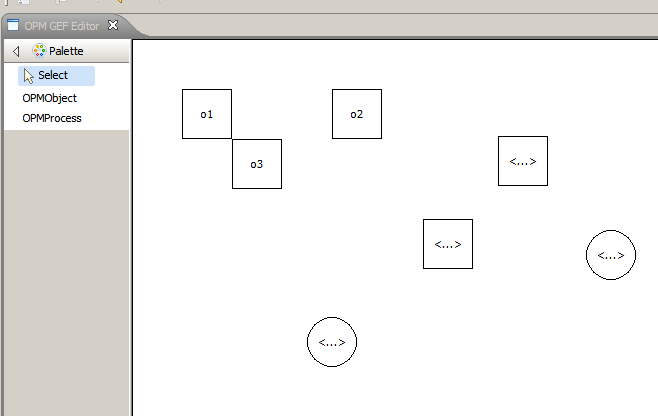
There is lots of work left, like moving the diagram entities, changing their names, and linking them. I promise to add these capabilities in the next few days.
The final eclipse project files can be downloaded here. Sorry, but the zip file somehow got broken, and I don’t have the time to fix it right now. maybe later 🙂
Bye…
Next Tutorial: Creating a GEF Editor – Part 7: Moving Elements and Direct Editing